

What Is an Eyebrow in Web Design? Meaning, Examples, HTML and Best Practices
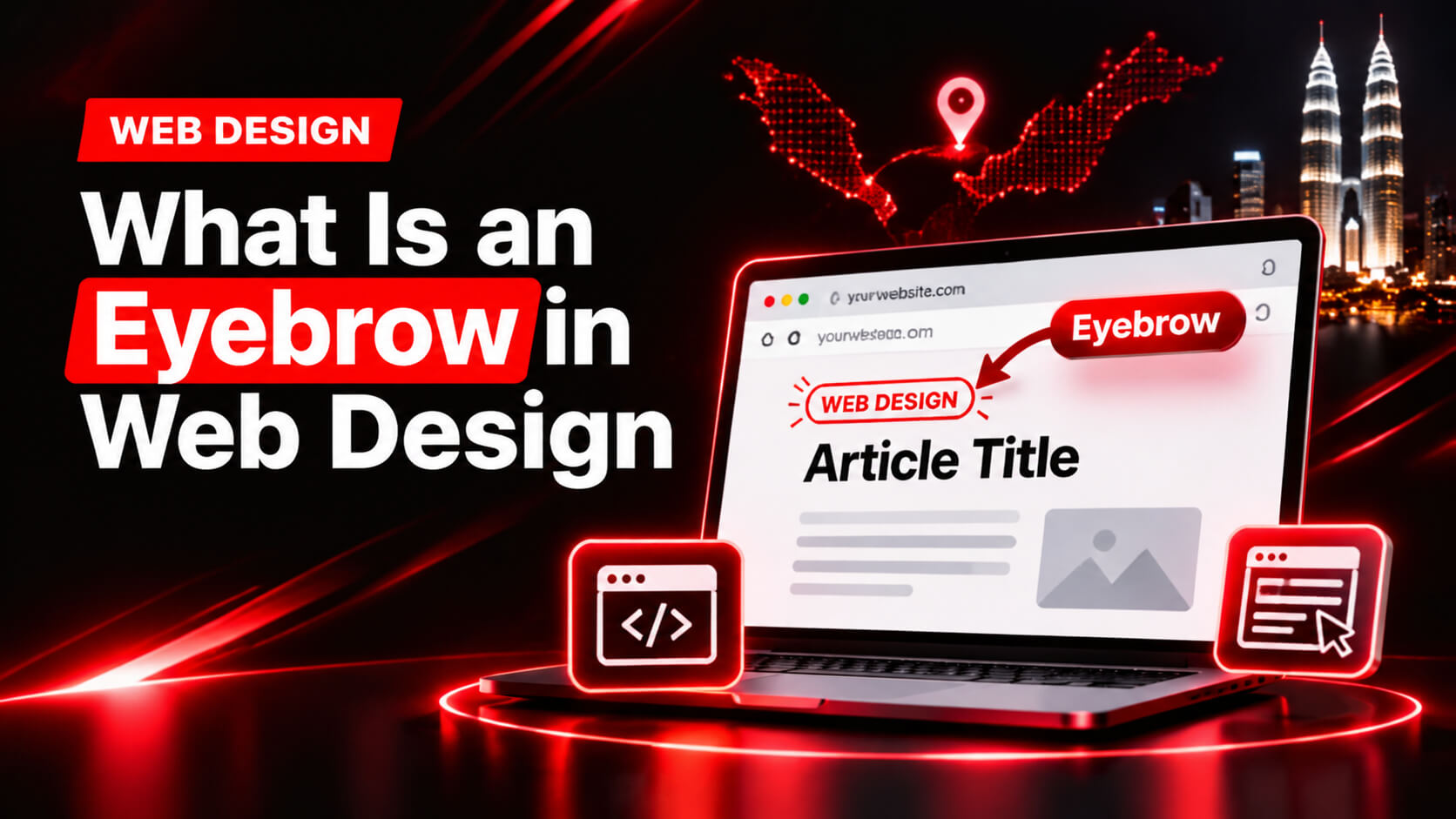
An eyebrow in web design is a short line of text placed directly above a heading to give the reader quick context. It usually has one to five words, such as “For Small Businesses”, “New Feature” or “Case Study”, and is styled smaller than the heading it introduces. Also called eyebrow text, an overline, a kicker or a pre-title, it helps visitors scan a page and understand each section before they read the main message.
Key Takeaways
- An eyebrow is a small label above a heading. It adds context but does not replace the heading.
- Keep eyebrow text short, specific and consistent across your website.
- Style it smaller, lighter or more spaced out than the heading, and keep enough colour contrast to read it easily.
- In HTML, mark it up as a normal paragraph or span, not as a heading tag.
- Eyebrows improve scannability and clarity, and they can support conversions when used with purpose.
- Use them where they help. Skip them where they only add clutter.
What Is an Eyebrow in Web Design?
An eyebrow is the small piece of text that sits above a main heading. Its job is to tell the reader what a section is about, who it is for or what type of content they are about to read. The reader sees the eyebrow first, then the heading, then the supporting text.
Here is a simple example from a business website:
FOR SMALL BUSINESSES
Get a Website That Brings in Enquiries
“For Small Businesses” is the eyebrow. It qualifies the audience so a visitor can decide in a second whether to keep reading. The line beneath it is the heading, and it carries the main message.
Where does the word “eyebrow” come from?
The term comes from print publishing. Newspapers and magazines place a small line above a headline to label the story, such as “Business” or “Opinion”. Journalists call it a kicker. Designers borrowed the idea for websites and, because the text sits above the heading like a brow above an eye, the name stuck.
What does an eyebrow do?
- Gives context: it tells readers what the section covers before they read it.
- Segments audiences: it shows who a page or product is for.
- Labels status: it marks content as new, popular, limited or updated.
- Creates hierarchy: it adds a clear first level above the heading.
- Improves scanning: it gives eyes an anchor point as people move down the page.
Other Names for Eyebrow Text
The same element goes by several names, depending on who you ask. If you are searching for “eyebrow label”, “eyebrow heading”, “eyebrow title” or “eyebrow header”, you are almost certainly looking for the same thing.
| Term | Where it comes from | Meaning |
|---|---|---|
| Eyebrow / eyebrow text | Web and UI design | Short text above a heading |
| Kicker | Journalism | Short label above a headline |
| Overline | Typography and design systems | Small text above a title |
| Pre-title or pre-heading | Content design | Text that comes before the main title |
| Category label | Blogs and cards | Eyebrow that names a topic or content type |
| Section label | Landing pages | Eyebrow that names a page section |
Eyebrow vs Heading, Subheading, Tagline and Label
Beginners often confuse eyebrows with other text elements. Each one has a different job and a different position.
| Element | Position | Purpose | Typical length |
|---|---|---|---|
| Eyebrow | Above the heading | Context, category, audience or status | 1 to 5 words |
| Heading (H1, H2, H3) | Main text of a section | States the main message or topic | 5 to 12 words |
| Subheading | Below the heading | Adds detail or explains the heading | 1 to 2 sentences |
| Tagline | Often near the logo or hero | Expresses the brand idea | 3 to 8 words |
| Badge or tag | On cards or buttons | Marks status, such as “New” or “Sale” | 1 to 2 words |
| Helper text | Near form fields or buttons | Gives instructions or reassurance | A short phrase |
The typical content hierarchy
- Eyebrow: small, gives context.
- Heading: largest, delivers the main message.
- Subheading: medium, adds detail.
- Body text: explains everything fully.
- Call to action: tells the reader what to do next.
Why Eyebrows Matter for UX and Conversions
Visitors scan, they do not read
Most people skim a web page for the parts that matter to them. Eyebrows give the eye an entry point at the start of each section. They signal that a new topic is starting, which makes long pages easier to move through.
They reduce mental effort
Every unclear section makes a visitor work harder. A clear eyebrow answers “what is this part about?” before they have to guess. Lower effort usually means more people stay on the page and reach your call to action.
They set expectations before the heading
When a visitor lands from an advert or a search result, they want quick proof they are in the right place. An eyebrow such as “For Clinics in Klang Valley” confirms relevance immediately and can reduce early exits.
They add structure without adding clutter
A page full of headings that all look the same can feel flat. A small, consistent eyebrow above each main heading adds a subtle layer of order, so the design feels organised and intentional.
Where to Use Eyebrows on a Website
Hero sections
The hero is the top part of your homepage or landing page. An eyebrow here can state the audience (“For Retailers”), announce something (“New: Online Booking”) or build trust (“Trusted by 200+ Businesses”, only if true and provable).
Section headers
On longer pages, eyebrows label each section: “Our Services”, “How It Works”, “Case Studies”, “Pricing”, “FAQs”. Used consistently, they work like signposts on a road.
Blog and article cards
Category labels such as “Tutorial”, “Guide”, “News” or “Case Study” help readers choose what to open. They also help you organise your content visually.
Pricing tables and product cards
Eyebrows can highlight plan types (“Most Popular”, “For Teams”) or product status (“New Arrival”, “Best Seller”). Keep claims honest. A “Most Popular” label should be based on real data.
Landing pages
Landing pages benefit from short labels that guide the reader through a story: “The Problem”, “Our Solution”, “What You Get”, “Next Steps”.
Where not to use them
- Above every heading on a page, just because you can
- On short sections where the heading is already clear
- Where the label repeats the heading word for word
- On cramped mobile layouts where it pushes content too far down
How to Write Good Eyebrow Text
Keep it to one to five words
If your eyebrow becomes a sentence, it is probably a heading or a subheading in disguise. Aim for a label a visitor can absorb in a split second.
Be specific, not clever
Clear beats creative. “Web Design for Retailers” tells the reader something. “Dream Big” does not. Save the wordplay for the heading if you want it.
Add something the heading does not say
The best eyebrows add information: an audience, a category, a stage or a status. If the eyebrow only repeats the heading, remove it.
Match the visitor’s intent
Use words your audience already uses. A visitor looking for a quote will recognise “Get a Quote” faster than “Begin Your Journey”.
Four types of eyebrow copy
- Category: “Services”, “Insights”, “Portfolio”
- Audience: “For Startups”, “For Clinics”, “For Online Stores”
- Benefit: “Save Time”, “Get More Enquiries”, “Reduce Costs”
- Status: “New”, “Updated”, “Limited Time”, “Popular”
Eyebrow Text Examples
Good and weak examples
| Weak eyebrow | Why it fails | Better eyebrow |
|---|---|---|
| We designed this section especially for small business owners | A full sentence, not scannable | For Small Businesses |
| Our Commitment To Your Security | Reads like a heading | Security First |
| Don’t Just Take Our Word For It | Catchy but gives no category | Testimonials |
| Welcome | Empty, adds no context | About BlackRevo |
| Think Different | A tagline, not a label | Our Approach |
Examples by page type
- Homepage hero: “Digital Marketing Agency in Malaysia”
- Services section: “What We Do”
- Process section: “How It Works”
- Testimonials: “Client Stories”
- Pricing: “Plans and Pricing”
- Blog card: “SEO Guide”
- Product card: “New Arrival”
- FAQ section: “Common Questions”
Eyebrow examples for Malaysian business websites
Malaysian sites often serve customers in English, Bahasa Malaysia and Mandarin. Eyebrows are short, so they are easy to adapt. Keep the language consistent within a page, or use proper language versions of each page.
| English | Bahasa Malaysia | Chinese |
|---|---|---|
| For Small Businesses | Untuk Perniagaan Kecil | 适合中小企业 |
| Why Choose Us | Kenapa Pilih Kami | 为什么选择我们 |
| Our Services | Perkhidmatan Kami | 我们的服务 |
| Client Stories | Kisah Pelanggan | 客户评价 |
| Serving Klang Valley | Berkhidmat di Lembah Klang | 服务巴生谷 |
Eyebrow Typography and Design Rules
Size
The eyebrow should be clearly smaller than the heading. A common range is about 12 to 16 pixels on desktop, with headings far larger. Avoid going below 12 pixels, because very small text is hard to read on phones.
Case and letter spacing
Many designers set eyebrows in uppercase with slightly wider letter spacing, often around 0.05 to 0.15em. This creates a clear visual difference from the heading without making the eyebrow large. Use CSS text-transform: uppercase to apply capitals rather than typing the text in all caps, because that keeps the source text natural for screen readers and easier to edit.
What does an all-caps eyebrow mean?
All caps is a style choice, not a rule. It signals “this is a label”. Short uppercase labels are easy to scan, but long uppercase phrases are tiring to read, which is another reason to keep eyebrows brief.
Weight and colour
Use a medium or semi-bold weight, or a brand accent colour, to set the eyebrow apart. A muted grey suits corporate or content-heavy sites. A bolder brand colour suits campaign or product pages. Whatever you choose, make sure the text has enough contrast with the background. The Web Content Accessibility Guidelines recommend a contrast ratio of at least 4.5 to 1 for normal-size text.
Spacing
Place the eyebrow close to its heading, with a gap of roughly 8 to 16 pixels, and leave more space above the eyebrow than below it. This groups the eyebrow with the heading it belongs to.
Alignment
Match the heading. Left-align both in text-heavy layouts. Centre both in hero sections that are centred. Never align them differently.
Font choice
Use the same font family as the rest of the site, or a font from the same superfamily. A clean sans-serif works well. Avoid decorative fonts at small sizes.
Mobile
Check how eyebrows wrap on narrow screens. A long eyebrow that breaks onto two lines looks untidy and pushes the heading down. This is another reason to keep text short, and a reason to build the page on a properly responsive web design foundation.
Eyebrow HTML and CSS Code
There is no official HTML “eyebrow” tag. You build one using a normal element, such as a paragraph or span, and style it with CSS. Developers searching for “eyebrow tag”, “html eyebrow” or “eyebrow html” are looking for this pattern.
Basic HTML structure
<section class=”hero”>
<p class=”eyebrow”>For Small Businesses</p>
<h1>Get a Website That Brings in Enquiries</h1>
<p>We design fast, mobile-friendly websites for Malaysian businesses.</p>
</section>
Basic CSS
.eyebrow {
margin: 0 0 12px;
font-size: 0.875rem; /* 14px */
font-weight: 600;
letter-spacing: 0.1em;
text-transform: uppercase;
color: #4a5568; /* check contrast against your background */
}
Why use a paragraph or span, not a heading tag?
Heading tags (H1 to H6) tell browsers, search engines and screen readers how your page is organised. An eyebrow is supporting text, not a section title, so marking it up as a heading can muddy that outline. Use a <p> for a standalone eyebrow, or a <span> if it sits inside another element.
Keeping the eyebrow and heading together
For a tidy structure, you can wrap them in a header element:
<header class=”section-header”>
<p class=”eyebrow”>How It Works</p>
<h2>Three Simple Steps to Launch Your Website</h2>
</header>
Optional: a small accent line
.eyebrow::before {
content: “”;
display: inline-block;
width: 24px;
height: 2px;
margin-right: 8px;
vertical-align: middle;
background: currentColor;
}
Design system tip
Create the eyebrow as a reusable class or component so every page uses the same size, colour and spacing. Consistency matters more than any single style choice. A well-built website made by a professional web development team will usually define it once in the design system.
Do Eyebrows Affect SEO and Accessibility?
Are eyebrows good or bad for SEO?
Eyebrow text is ordinary text on the page, so search engines can read it. It does not carry the weight of a heading, and it is not a ranking trick. What helps SEO indirectly is the better user experience: clearer sections, easier scanning and less confusion. Use eyebrows to help people, not to stuff keywords.
Should an eyebrow be an H2 or H3?
No. Keep your real heading as the H1, H2 or H3 and mark the eyebrow as a paragraph or span. If you tag both as headings, you create two headings for one section, which confuses the page outline. A clean heading structure is part of technical SEO, and it helps both search engines and AI systems understand what each section covers.
Can eyebrow text help with AI Overviews and AI search?
Eyebrows are not an AI ranking factor, but the clarity they bring helps. AI systems and search engines both prefer pages with a clear structure, specific labels and direct answers. A good eyebrow that states the audience or topic supports that clarity, as long as the real heading and body text carry the main information. Writing pages in this way is part of content optimization.
Accessibility checklist
- Use enough colour contrast, with a ratio of at least 4.5 to 1 for normal text.
- Do not rely on colour alone to convey meaning.
- Keep the eyebrow before the heading in the source order, so screen readers read it in the same sequence as sighted users.
- Use CSS for uppercase styling instead of typing capital letters in the text.
- Keep it short so it reads cleanly aloud.
- Test at zoom levels up to 200 percent and on small screens.
Eyebrows in Email Design
Email marketers also use eyebrows. In an email, the eyebrow is a small line above the headline, such as “Weekly Update” or “New Arrivals”. It should not be confused with the preheader, which is the preview text that appears next to the subject line in an inbox. The eyebrow lives inside the email body. The preheader appears outside it.
Common Eyebrow Mistakes
- Making it too long: A sentence is not an eyebrow.
- Making it too big or bold: It should support the heading, not compete with it.
- Repeating the heading: If the eyebrow adds nothing, delete it.
- Using vague wording: “Welcome” and “Hello” give no context.
- Inconsistent styling: Different colours and sizes in different sections confuse the pattern.
- Marking it as a heading: This muddies your page structure.
- Low contrast: Light grey text on white looks stylish but fails many readers.
- Overusing it: If every element has an eyebrow, none of them stand out.
- Stuffing keywords: Eyebrows are for readers, not for search tricks.
- Making unproven claims: Labels like “No. 1” or “Most Popular” should be supportable.
Eyebrow Checklist
- It has one to five words.
- It sits directly above its heading.
- It adds context, audience, category or status.
- It is smaller than the heading.
- It uses the same style across the whole site.
- It has enough colour contrast.
- It is marked up as a paragraph or span, not a heading.
- It is built with CSS for uppercase and spacing.
- It reads well on mobile.
- It is truthful and specific.
How BlackRevo Can Help
Small details such as eyebrows only work when the whole website is built well. BlackRevo is a digital marketing agency in Petaling Jaya, Selangor, helping Malaysian businesses with SEO and web development. Our web development service focuses on clean structure, mobile-friendly layouts and pages designed to turn visitors into enquiries. We combine that with technical SEO and content optimisation so your design, code and copy all work together.
Planning a new website or a redesign?
Contact BlackRevo to discuss your goals and get practical advice on structure, design and SEO.
Frequently Asked Questions About Eyebrows in Web Design
What is an eyebrow in web design?
An eyebrow is a short line of text above a heading that gives context, such as a category, audience or status. It helps visitors understand a section before they read the main heading.
What is eyebrow text?
Eyebrow text is the small label placed above a headline or title. Examples include “New Feature”, “For Teams” and “Case Study”. It is usually one to five words long.
Why is it called an eyebrow?
The name comes from its position. Like a brow above an eye, the text sits above the main heading. The idea was borrowed from print design, where journalists call the same element a kicker.
What is the difference between an eyebrow and a heading?
An eyebrow is small supporting text that labels or contextualises a section. A heading is the main title of the section and carries the primary message. The eyebrow comes first and is visually less prominent.
What is an all-caps eyebrow?
It is an eyebrow styled in uppercase letters, often with extra letter spacing. It is a design choice used to make short labels stand out from headings. Apply it with CSS rather than typing the text in capitals.
How long should eyebrow text be?
One to five words is a good guideline. If you need more, you are probably writing a heading or subheading.
What is the HTML tag for an eyebrow?
There is no dedicated eyebrow tag. Use a paragraph (<p>) or span (<span>) with a class such as “eyebrow”, then style it with CSS.
Should an eyebrow be an H2 or H3 tag?
No. Use a heading tag for the actual heading and a paragraph or span for the eyebrow, so the page outline stays clean for search engines and screen readers.
What font size should an eyebrow be?
Typically around 12 to 16 pixels on desktop, smaller than the heading and often similar to or slightly smaller than body text. Avoid sizes that are hard to read on mobile.
Recent Posts


November 16, 2026
What Is a Responsive Website and Why Does Your Business Need One?

November 13, 2026



Leave a comment